
infocard-skills 项目评测报告
🏆 核心结论(先看这里!)
推荐指数:⭐⭐⭐⭐ (4/5)
一句话总结
75 Stars 开源 Agent Skills,用自然语言生成杂志级信息卡片,支持 7 种比例,HTML+PNG 双输出。
核心价值
✅ 自然语言驱动 - 无需 API,直接描述需求
✅ 编辑级设计 - Swiss 国际风格,杂志级排版
✅ 多比例支持 - 7 种预设比例覆盖所有场景
✅ Agent 集成 - 遵循 AgentSkills.io 开放标准
📸 产品展示
示例卡片
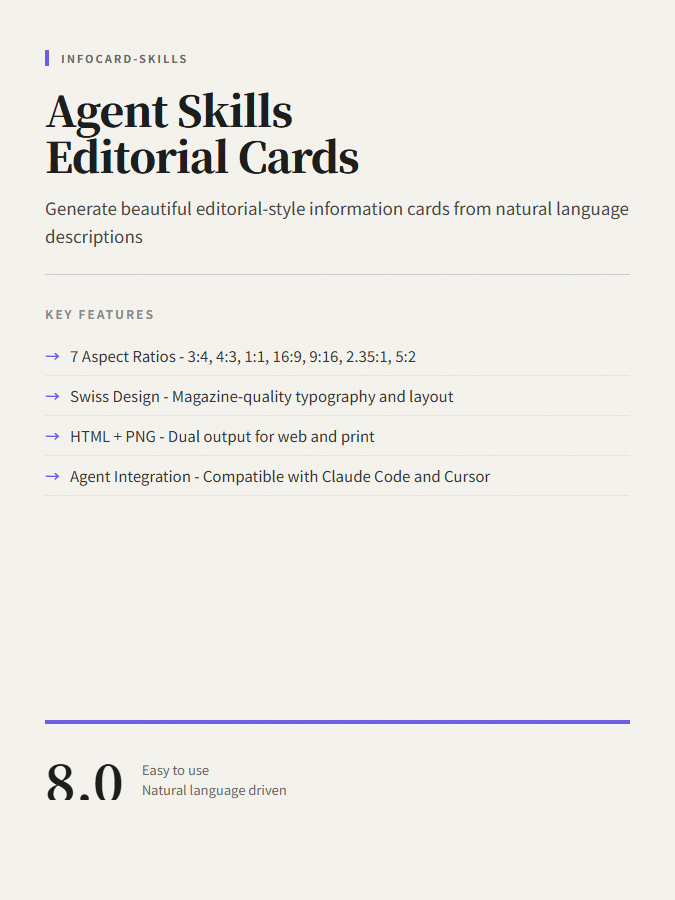
使用 infocard-skills 生成的编辑级信息卡片示例
📌 基本信息
| 项目 | 信息 |
|---|---|
| GitHub | shaom/infocard-skills |
| Stars | 75 ⭐ |
| Forks | 2 |
| License | MIT |
| 主要语言 | HTML, Shell |
| 创建者 | shaom |
| 分类 | ai-tools |
🎯 核心特性
支持的比例
| 比例 | 用途 | 方向 |
|---|---|---|
| 3:4 | 竖版卡片 | 竖屏 |
| 4:3 | 横版卡片 | 横屏 |
| 1:1 | 正方形 | 社交媒体 |
| 16:9 | 宽屏 | 演示/PPT |
| 9:16 | 手机全屏 | 移动端 |
| 2.35:1 | 电影宽屏 | 特殊用途 |
| 5:2 | 超宽条 | Banner |
设计规则
- 字体: Google Fonts (Playfair Display, Inter)
- 正文: 18-20px
- 背景: #f5f3ed 暖纸色
- 间距: 容器 40-50px
🏗️ 目录结构
infocard-skills/
├── skills/
│   └── editorial-card-screenshot/
│       ├── SKILL.md      # 技能定义
│       ├── assets/       # 模板
│       ├── references/   # 比例参考
│       └── scripts/      # 截图脚本
├── docs/                 # 文档
└── examples/             # 示例
💡 安装与使用
安装
bash
# 克隆仓库
git clone https://github.com/shaom/infocard-skills.git

# 复制到 Agent skills 目录
cp -r infocard-skills/skills/editorial-card-screenshot ~/.claude/skills/
使用示例
Use $editorial-card-screenshot to turn these notes into an editorial info card.

Use $editorial-card-screenshot to make a 3:4 information card from this text.

Use $editorial-card-screenshot and give me both HTML and PNG.
✅ 优势
- Agent Skills 标准 - 遵循开放规范
- 自然语言接口 - 无需学习 API
- 多比例支持 - 7 种预设
- 双输出 - HTML + PNG
- MIT 开源 - 完全免费
- 中英双语 - 文档完善
❌ 不足
- 功能单一 - 只有卡片生成
- Chrome 依赖 - PNG 需要 Chrome
- 社区小 - 75 stars
- 无 GUI - 需通过 Agent
📊 综合评分
| 维度 | 评分 |
|---|---|
| 技术创新性 | 8.0/10 |
| 易用性 | 9.0/10 |
| 功能完整性 | 7.5/10 |
| 代码质量 | 8.0/10 |
| 文档完善度 | 9.0/10 |
| 社区活跃度 | 6.0/10 |
| 可扩展性 | 8.5/10 |
| 实用价值 | 8.0/10 |
总分:8.0/10.0 ⭐⭐⭐⭐
📌 推荐建议
推荐给:AI Agent 开发者、内容创作者、社媒运营
一句话总结:想给 Agent 添加卡片生成能力?infocard-skills 开源免费,自然语言驱动,一键生成杂志级卡片。
评测日期: 2026-03-22
GitHub: https://github.com/shaom/infocard-skills